Vehicle Structure allows you to configure the clearance around the vehicle, helping evSense estimate the positions of the seat and armrests more accurately.
Note:
These settings do not physically adjust the seat or armrests. Configure them after making any physical adjustments, and select values that match the actual hardware positions.
This guide explains how to configure the seat height, armrest positions, and clearance, and then save and apply your changes.
¶ Before You Start
- Power on the vehicle and keep it stationary.
- Check the actual seat height, armrest widths, and armrest heights.
- Allow time for an evSense model update if you change armrest width or vehicle clearance.
¶ Open Vehicle Structure
On the vehicle:
- Open Settings.
- Go to evSense → Vehicle Structure.
The page contains three sections:
- Seat Position
- Armrest Position
- Vehicle Clearance
¶ Set the Seat Height
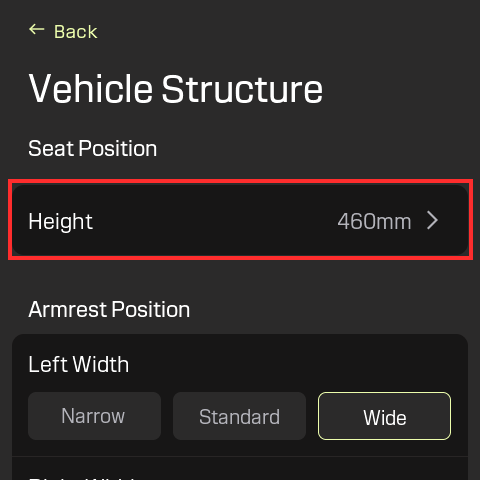
- Under Seat Position, find Height.
- Check the height marked on the vehicle pillar.
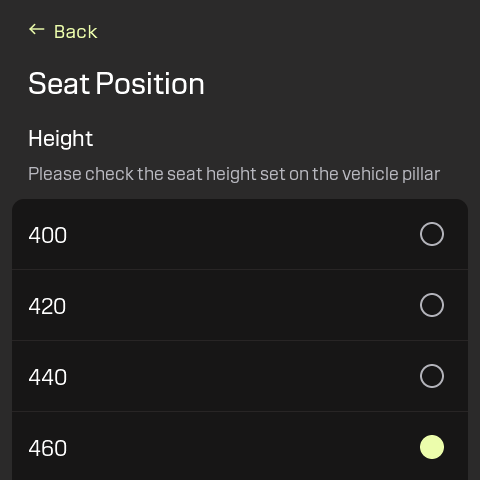
- Select the matching value.
Available seat heights are 400, 420, 440, 460, 480, and 500 mm.
A green dot indicates the selected height.
Selecting a height here does not move the seat. It records the height already set on the vehicle.
¶ Set the Armrest Positions
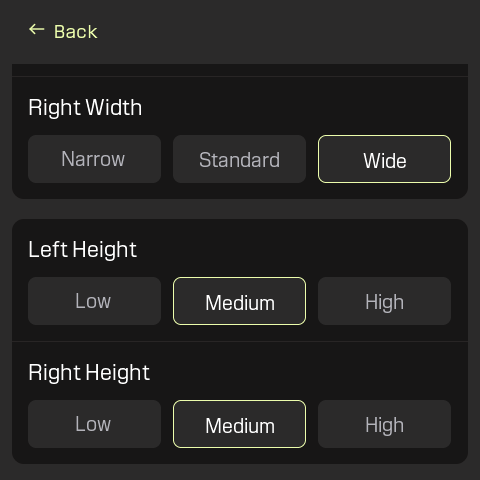
Under Armrest Position, select the options that match each armrest’s actual position.
| Setting | Available options |
|---|---|
| Left Width | Narrow, Standard, Wide |
| Right Width | Narrow, Standard, Wide |
| Left Height | Low, Medium, High |
| Right Height | Low, Medium, High |
Selected options have an outline.
After physically adjusting an armrest, update its corresponding setting here. After changing armrest width, update Vehicle Structure before using assisted driving.
¶ Adjust Vehicle Clearance
Scroll to Vehicle Clearance.
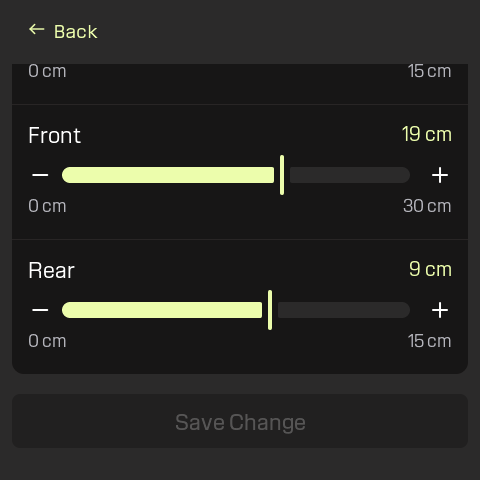
Use the sliders or “−” / “+” controls to adjust the clearance on each side.
| Side | Clearance range |
|---|---|
| Left | 0–15 cm |
| Right | 0–15 cm |
| Rear | 0–15 cm |
| Front | 0–30 cm |
Each control shows its current value, a slider, and − / + controls.
If an accessory extends beyond the vehicle, adjust the corresponding side to account for its size. You can also increase clearance if you prefer more space around obstacles.
¶ Save and Apply Changes
- Scroll to the bottom of the page.
- Tap Save Change.
- Check that the settings match your actual vehicle.
- Confirm the changes.
Save Change is grey when no values have changed.
The changes you make determine whether an update is needed:
| Changes made | What happens |
|---|---|
| Seat height or armrest height only | Saved without a trajectory-library update. |
| Armrest width or vehicle clearance | Requires an evSense model update. |
¶ During an evSense Model Update
The screen may show “evSense Model Update”. The update can take several minutes.
During the update:
- Only Manual Mode is available if you need to drive.
- Assisted driving and Live View are unavailable.
- Automatic sleep and shutdown timers are paused. They start counting again after the update finishes.
Do not put the vehicle to sleep, power it off, or enter Range Mode during the update. Interrupting it can prevent your changes from being applied.
¶ Retry a Failed Update
If the update fails, the screen shows:
“Update Failed”
“Vehicle Structure changes weren't applied to evSense.”
To retry:
- Return to Vehicle Structure.
- Check the settings, including whether the previous dimensions have been restored.
- Make sure the settings match the vehicle’s actual hardware positions.
- Save and apply the changes again.
Before using evSense after a failure, verify that its vehicle dimensions match the actual vehicle.
¶ Leave Vehicle Structure
Save and apply any changes before leaving, then tap Back to return to evSense.
If an Unsaved Changes dialog appears:
| Option | Action |
|---|---|
| Cancel | Return to the page so you can save your changes. |
| Quit | Leave without saving. |
¶ Understand the Display
| Screen element | What you will see |
|---|---|
| Page sections | Seat Position, Armrest Position, Vehicle Clearance |
| Seat height units | Millimetres (mm) |
| Clearance units | Centimetres (cm) |
| Selected seat height | A green dot |
| Selected armrest options | An outline |
| Clearance controls | Current value, slider, and “−” / “+” controls |
| No values changed | Save Change is grey |
| Changes being applied | The screen may show “evSense Model Update” |
| Update failure | “Update Failed” — “Vehicle Structure changes weren't applied to evSense.” |
¶ Safety Information
- Software settings must match the vehicle’s actual hardware positions.
- After physically adjusting an armrest, update its corresponding setting.
- After changing armrest width, update Vehicle Structure before using assisted driving.
- Do not put the vehicle to sleep, power it off, or enter Range Mode during a model update.
- During the update, use Manual Mode only if you need to drive.
- After an update failure, check whether previous settings were restored and verify the dimensions before using evSense.
¶ Frequently Asked Questions
¶ Does selecting a seat height move the seat?
No. Select the value that matches the height already set on the vehicle.
¶ Why is evSense unavailable after saving changes?
Changes to armrest width or vehicle clearance require an evSense model update. Wait for it to finish before using evSense.
During the update, only Manual Mode is available. Assisted driving and Live View are unavailable.
¶ Do height changes also require an update?
Changes to seat height or armrest height alone are saved without a trajectory-library update.
¶ Where can I adjust vehicle clearance?
Go to Vehicle Settings → evSense → Vehicle Structure, then scroll to Vehicle Clearance.
¶ What should I do if an accessory extends beyond the vehicle?
Adjust the clearance on the corresponding side to account for the accessory’s size.
¶ What should I do if the update fails?
Return to Vehicle Structure, check the settings, and apply the changes again.
Check whether previous dimensions were restored and make sure the settings match your actual vehicle before using evSense.
¶ Can I leave without saving?
Yes. If the Unsaved Changes dialog appears, select Quit to leave without saving. Select Cancel to return and save.