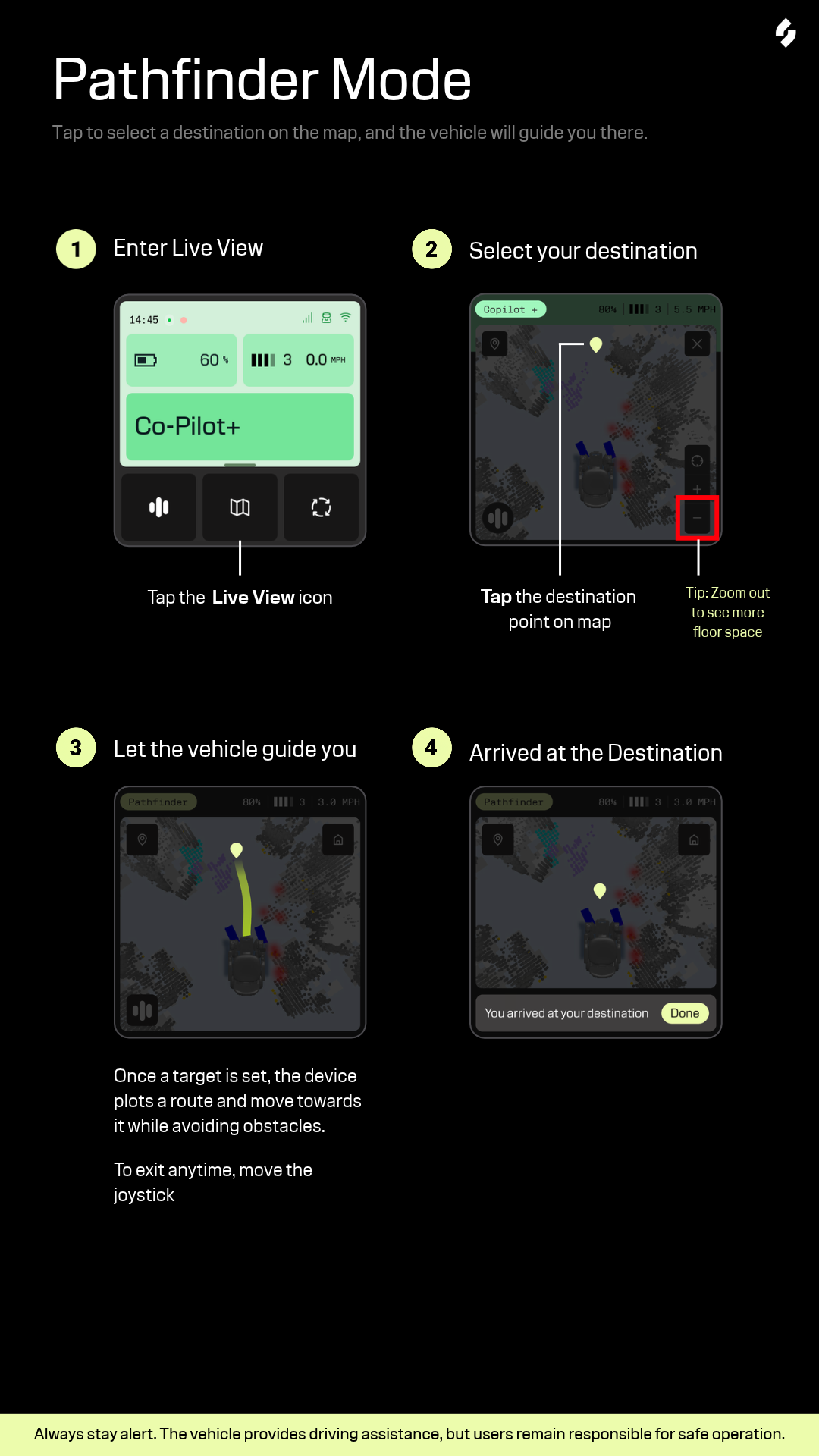
Pathfinder lets you choose a temporary, nearby destination in Live View. The vehicle automatically plans a route and drives to it without using a saved location.
It is designed to help you move to a visible nearby destination and manoeuvre out of tight or challenging spaces. It uses LiDAR sensors, time-of-flight (ToF) sensors, ultrasonic sensors, and cameras to detect its surroundings.
This guide explains how to enable Auto-Pilot, choose a destination, understand obstacle notifications, and exit navigation.
Stay alert and be ready to take over at any time.
¶ Before You Start
- Review the required waiver. In the Strutt app, review and sign Enable Auto-Pilot before using Auto-Pilot. See Review and Accept Safety Waivers.
- For hands-free use, review the additional waiver. Review and sign Enable Auto-Pilot Hands-free in the Strutt app before using Auto-Pilot Hands-free.
- Choose a clear area. Do not use these features in crowded or obstructed areas.
- Stay alert. Be ready to take over at any time.
¶ Enable Auto-Pilot
- On the vehicle, open Settings.
- Go to evSense → Auto-Pilot.
- Turn Auto-Pilot on.
For hands-free use, also go to Settings → evSense → Auto-Pilot Hands-free and turn it on after completing the additional waiver.
¶ Start Pathfinder Navigation
- On the vehicle Home screen, tap the Live View icon.
- Tap your intended destination on the Live View map.
- Tap Start.
- The vehicle plans a route and drives to the selected destination.
Pathfinder uses a temporary destination rather than a saved waypoint.
¶ If an Obstacle Blocks the Route
The vehicle tries to find the shortest path to the destination. If an obstacle is in the way, it recalculates the route and goes around the obstacle.
If the destination is physically impossible to reach, the vehicle displays “Route is out of reach.”
¶ Exit Auto-Pilot
You can exit Auto-Pilot by:
- Pushing the joystick.
- Pressing the Power button.
- Changing the driving mode.
- Using the Smart Push Handle.
¶ Safety Restrictions
- Do not use Pathfinder in crowded or obstructed areas.
- Remain alert and ready to take over.
- The source guide states a maximum speed of 2.8 mph (approximately 4.5 km/h).
¶ Frequently Asked Questions
¶ Do I need to save a waypoint first?
No. Pathfinder uses a temporary destination selected in Live View.
¶ What is the difference between Pathfinder and Waypoints?
Pathfinder takes you to a temporary nearby destination. Waypoints lets you save locations on a map and return to them, for example along repeated routes at home.
¶ What does “Route is out of reach” mean?
The vehicle cannot physically reach the selected destination.
¶ How do I exit Pathfinder?
Push the joystick, press the Power button, change the driving mode, or use the Smart Push Handle.