Privacy Mode lets you turn off the vehicle’s front camera, rear camera and microphone according to the settings you choose. Use it to help protect your privacy and the privacy of people around you, especially in private spaces such as washrooms.
This guide explains how to choose which sensors to restrict, turn Privacy Mode on and off, understand its notifications, and check which functions remain available.
¶ Before You Start
- Choose your sensor settings first. Select which cameras and microphone you want to turn off when Privacy Mode is active.
- All three settings are On by default. If you leave every setting On, turning on Privacy Mode will not turn off any sensors.
- Understand the effect on driving features. Some evSense features may be disabled in Privacy Mode, and the vehicle may not detect obstacles properly. Some AI Assistant functions may also be unavailable.
¶ Configure Sensors for Privacy Mode
- On the vehicle, open Settings.
- Go to Vehicle Mode → Privacy Mode.
- Configure each setting according to your preference:
| Setting | On | Off |
|---|---|---|
| Front Camera | Leaves front camera access enabled when Privacy Mode is active. | Turns off front camera access when Privacy Mode is active. |
| Rear Camera | Leaves rear camera access enabled when Privacy Mode is active. | Turns off rear camera access when Privacy Mode is active. |
| Microphone | Leaves microphone access enabled when Privacy Mode is active. | Turns off microphone access when Privacy Mode is active. |
Set a sensor to Off if you want Privacy Mode to restrict it. You can choose a different setting for each sensor.
¶ Turn On Privacy Mode
- Press the Strutt button on the armrest to open the Strutt menu.
- Go to Vehicle Mode.
- Select Privacy.
- Read the confirmation message and select Turn On to enable Privacy Mode, or Cancel to leave it off.
The confirmation message depends on your sensor settings:
| Your settings | Message | What it means |
|---|---|---|
| At least one sensor is set to Off | Turn on Privacy Mode? | Cameras and microphone access set to Off will be unavailable. Some evSense features and AI Assistant may be unavailable. |
| All sensors are set to On | No sensors restricted | All cameras and microphone access are set to On. Turning on Privacy Mode will not turn off any sensors. |
Both messages offer Cancel and Turn On.
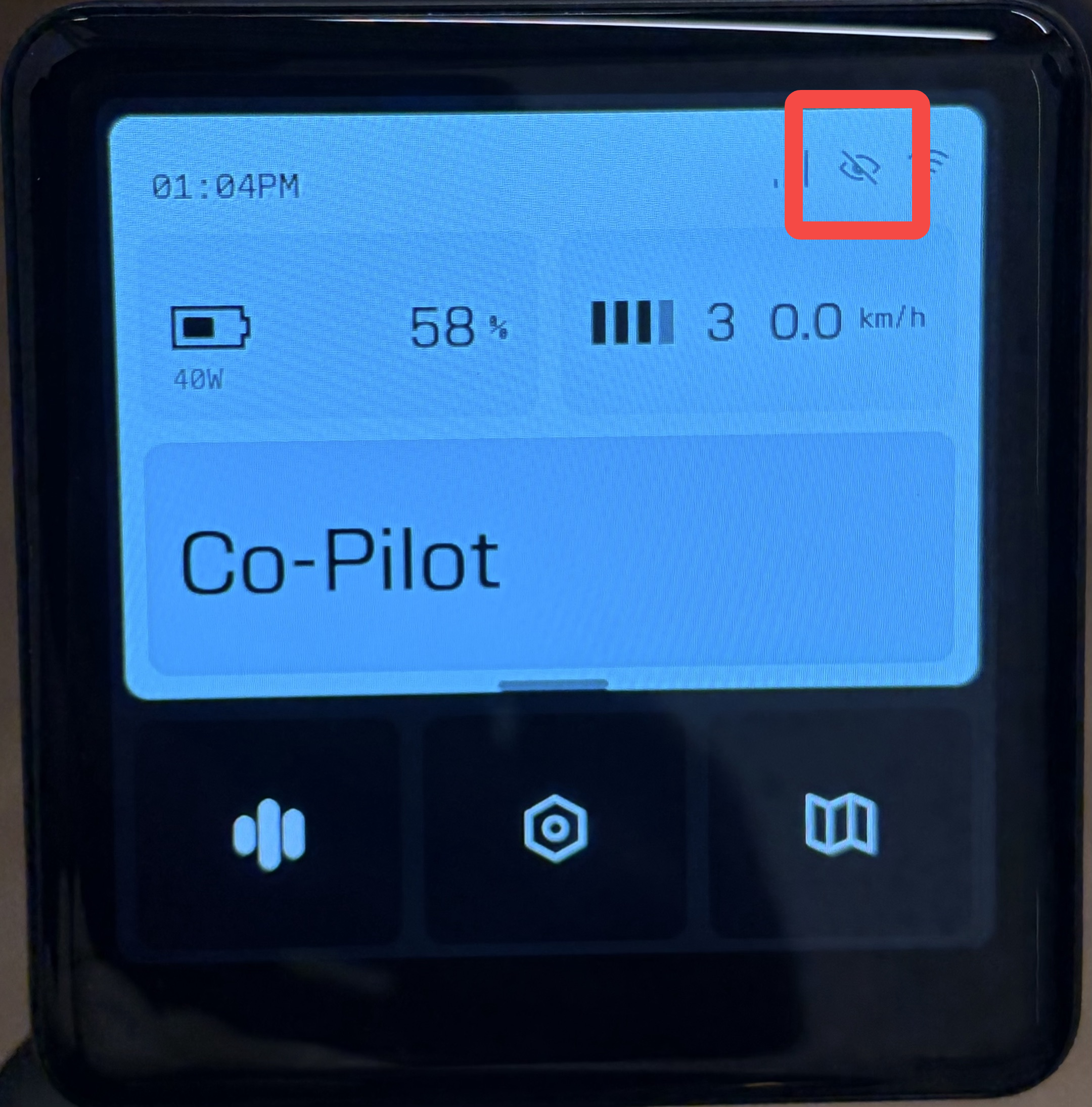
When the Privacy Mode is switched on, you will see an indicator on the top right of the home page.
¶ Use Other Functions with Privacy Mode
The source guide lists the following compatibility:
| Function | Compatible with Privacy Mode? |
|---|---|
| Manual Mode | Yes |
| Co-Pilot Mode | Yes |
| Co-Pilot+ Mode | Yes |
| Waypoints, Pathfinder and Maps (Auto-Pilot) | No |
| Essential Mode | Yes |
| Range Mode | Yes |
| Smart Push Handle | Yes |
| AI Assistant | Listed as compatible, but will become unavailable if the microphone is turned off. When you're trying to access the AI Assistant, you will be prompted with a message to turn off the Privacy Mode. |
| Cruise Mode | Yes |
| Follow Mode | No |
Compatibility does not mean that every feature remains available. Some evSense features can be disabled in Privacy Mode, and obstacle detection may not work properly. The confirmation message also warns that AI Assistant may be unavailable.
¶ Turn Off Privacy Mode
- Press the Strutt button on the armrest to open the Strutt menu.
- Go to Vehicle Mode.
- Select Privacy again to disable Privacy Mode.
- Look for the Privacy Mode Off notification.
¶ Frequently Asked Questions
¶ Does turning on Privacy Mode automatically turn off every camera and the microphone?
No. Privacy Mode only restricts the sensors you have set to Off under Settings → Vehicle Mode → Privacy Mode. All three settings are On by default.
¶ Why do I see “No sensors restricted”?
Your front camera, rear camera and microphone settings are all On. Turning on Privacy Mode with these settings will not turn off any sensors. To restrict a sensor, set it to Off in the Privacy Mode settings.
¶ Can I choose which camera or microphone to turn off?
Yes. You can configure the Front Camera, Rear Camera and Microphone settings individually.
¶ Will Privacy Mode affect obstacle detection?
It may. Some evSense features can be turned off in Privacy Mode, and the vehicle may not detect obstacles properly.
¶ Can I use Waypoints, Pathfinder, Maps or Follow Mode while Privacy Mode is active?
Waypoints, Pathfinder and Maps (Auto-Pilot) and Follow Mode as incompatible with Privacy Mode. If you try to use them with Privacy Mode, there will be a confirmation message to prompt you to turn off the Privacy Mode.
¶ Can I use AI Assistant in Privacy Mode?
The AI Assistant remains available in Privacy Mode only when microphone access is enabled. If Privacy Mode is configured to disable the microphone, attempting to use the AI Assistant will prompt you to turn off Privacy Mode.
¶ How do I turn off Privacy Mode?
Press the Strutt button on your armrest to open up the Strutt menu, scroll down to the Vehicle Mode, and select Privacy again. The vehicle displays Privacy Mode Off.