Drive Settings lets you adjust how your vehicle responds to straight-line driving, turning, and front-wheel steering.
This guide explains where to find these settings, how to adjust each response, and how Drive Settings differs from Speed Levels and Drive Controls.
¶ Before You Start
- Keep the vehicle stationary while adjusting settings.
- Make changes gradually. Become familiar with the new response before continuing to drive.
¶ Open Drive Settings
On the vehicle:
- Open the Menu.
- Select Settings.
- Go to Quad Drive → Drive Settings.
¶ Adjust the Driving Response
Use the sliders or the “−” / “+” controls to adjust each setting.
| Setting | What it does |
|---|---|
| Linear Sensitivity | Adjusts the response for straight-line driving. |
| Turning Sensitivity | Adjust the response for turning. |
| Front-Wheel Steering Sensitivity | Adjust the response for front-wheel steering. |
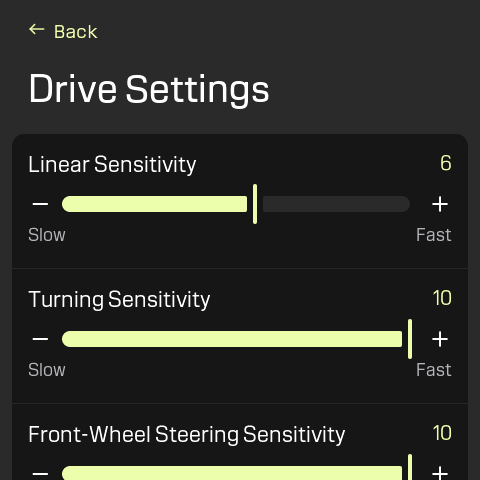
For each setting:
- Move toward Slow for a slower response.
- Move toward Fast for a faster response.
- A higher value gives a faster response.
¶ Understand the Related Settings
These settings control different aspects of driving:
| Setting | Purpose |
|---|---|
| Drive Settings | Adjusts how the vehicle responds to driving inputs. |
| Speed Levels | Sets the vehicle’s speed limits. |
| Drive Controls | Determines which control source can drive the vehicle. |
Drive Settings does not change speed limits. Use Speed Levels to adjust speed limits.
¶ Safety Information
- Adjust settings only while the vehicle is stationary.
- A higher value produces a faster response.
- Change settings gradually and become familiar with the response before continuing to drive.
¶ Frequently Asked Questions
¶ Where can I find Drive Settings?
Go to Menu → Settings → Quad Drive → Drive Settings.
¶ How do I make the vehicle respond more slowly?
Move the relevant slider toward Slow, or use the “−” control to lower its value.
¶ How do I make the vehicle respond faster?
Move the relevant slider toward Fast, or use the “+” control to increase its value.
Make changes gradually and become familiar with the new response before continuing to drive.
¶ Do these settings change the speed limits?
No. Drive Settings adjusts driving response. Use Speed Levels to adjust speed limits.
¶ Where is Front-Wheel Steering Sensitivity?
Scroll down on the Drive Settings page to find the third slider.