¶ Battery Charging
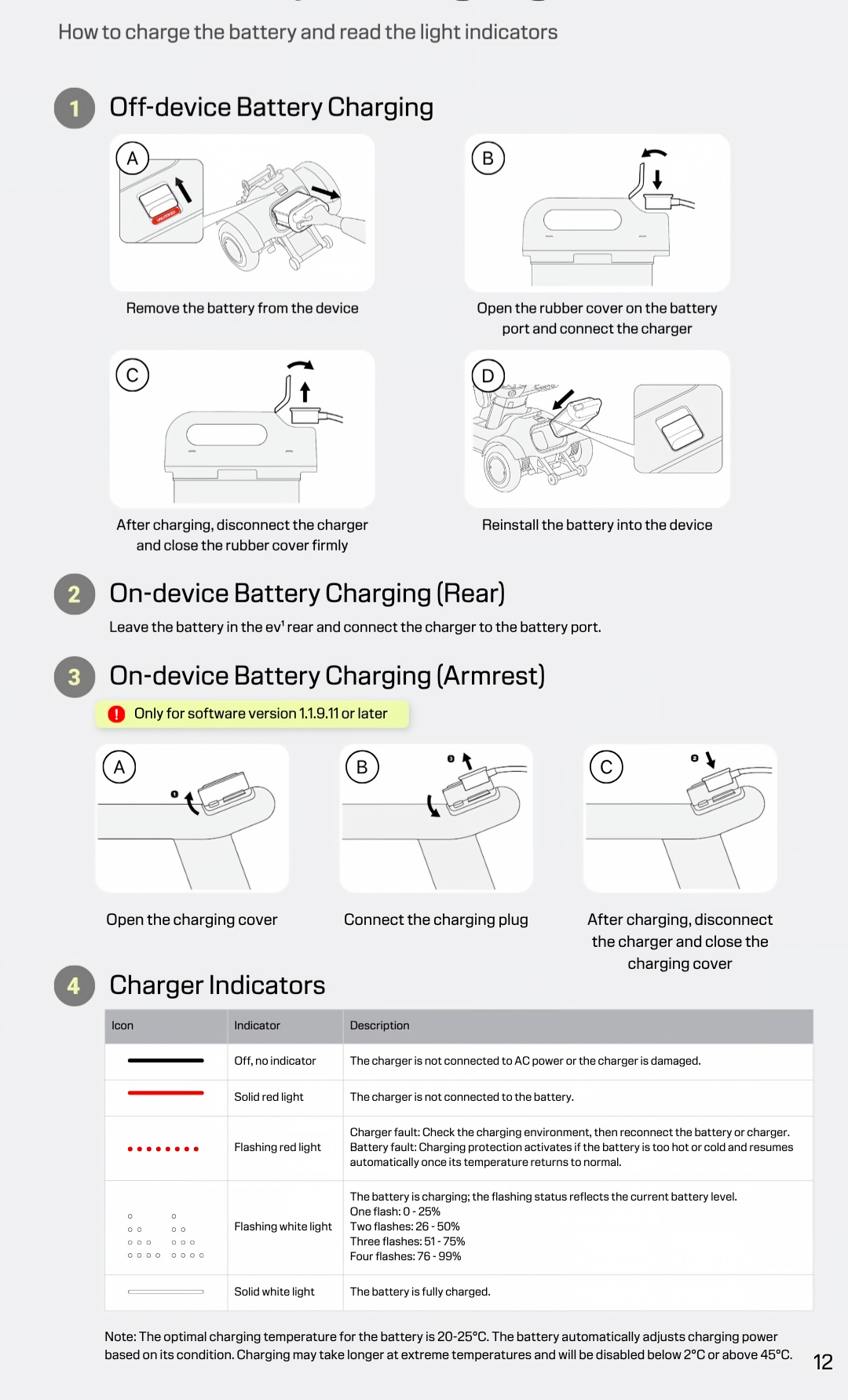
- You can charge the battery anytime and anywhere, as there are no restrictions on when to charge.
- During fast charging, the battery and charger may become noticeably warm. This is normal. Do not cover the battery or charger with any objects, as this may affect heat dissipation.
- The battery and charger both have comprehensive built-in protections to prevent overcharging. It is still recommended to remove the charger promptly once the battery is fully charged.
Note
After each software update, please charge the battery to 100%. This helps recalibrate the battery level reading and reduces the likelihood of an unexpected loss of power during use.
¶ Charger Indicator Light
When charging the battery separately, the charger indicator light only shows an estimated battery level. It is meant to help you quickly check the charging progress. For a more accurate battery level, refer to the percentage shown on the screen.
¶ Charging Time
- Long-range battery: 0 to 80% takes approximately 2 hours, and 0 to 100% takes approximately 4 hours.
- Aviation battery: 0 to 80% takes approximately 1.2 hours, and 0 to 100% takes approximately 1.8 hours.
When the temperature is too low or too high, the battery will automatically adjust the charging power, and charging time will be extended accordingly.
¶ Charging From a Portable Power Station
The continuous output of the power station's AC port should be greater than 400 W. We recommend a power station rated 500 W or above.
¶ Charging Temperature
- The optimal charging temperature for the battery is 20°C (68°F) to 25°C (77°F).
- The battery will automatically adjust its charging power based on its condition. Charging may take longer in extreme temperatures.
- Charging is disabled when the temperature is below 2°C (35.6°F) or above 45°C (113°F).
¶ If the Battery Percentage Seems Inaccurate
The displayed battery level may gradually become less accurate if the battery is rarely charged until the indicator shows a solid white light or if the vehicle frequently remains powered on while charging.
The battery includes an automatic calibration algorithm that corrects accumulated battery level errors when the battery reaches a full charge or becomes completely depleted. However, you should not intentionally drain the battery to 0% for calibration.
To recalibrate the battery:
- Power off the vehicle and remove the battery.
- Connect the charger directly to the battery.
- Allow the battery to charge without interruption until the indicator shows a solid white light.
Charging may slow after the battery reaches approximately 90% while it completes the final charging and calibration process. In some cases, this may take longer than a normal charging cycle.
For the most accurate battery level readings, allow the battery to reach a full charge whenever practical. We also recommend fully charging the battery after each OTA software update before using the vehicle.
The battery calibration algorithm will continue to be improved through future software updates to optimize performance and the overall user experience.