¶ Strutt ev¹ Map, Wi-Fi, or Rear Camera Unavailable Troubleshooting Guide
Document ID: TS000001
Applicable product: Strutt ev¹
¶ Applicable Symptoms
After a firmware update, the device may exhibit one or more of the following symptoms:
- The map is not displayed;
- Wi-Fi cannot connect;
- The rear camera image is not displayed;
- Intelligent driving features are temporarily unavailable.
▶ Play portrait video: Map and Bluetooth connectivity failure example
1. Map and Bluetooth connectivity failure example
▶ Play portrait video: Rear camera failure example
2. Rear camera failure example
Safety notice
Park the device on a safe, level surface and power it off before disassembly. Internal connection checks should be performed by personnel with repair experience. Keep all screws and covers secure, and avoid pulling or pinching the wiring harnesses.
¶ 1. Confirm the Firmware Version and Update Status
- Go to Information → Version, record the current firmware version, and take a photo for reference if possible;
- Confirm whether the map, Wi-Fi, and rear camera worked normally before the update;
- If the update process clearly reported a failure, keep the device connected to a stable power supply and run the update again;
- If the update completed but the functions remain unavailable, continue with the checks below.
¶ 2. Check External Operating Status
¶ Check the Rear Illumination Light
Shift the device into reverse and check whether the rear illumination light turns on normally. Record the result.
¶ Check the ToF Module
Point a phone camera at the left or right ToF module. When the module is operating normally, red light spots are usually visible in the phone camera image.
Infrared light may appear differently on different phone cameras. If the result is unclear, record a short video and send it to the Strutt Technical Support team.
¶ 3. Locate and Repair the Hardware Connection
- If both the rear illumination light and the ToF module operate normally, the likely cause is a loose Type-C module connection (hardware issue).
- Repair procedure:
- Remove the armrest cover;
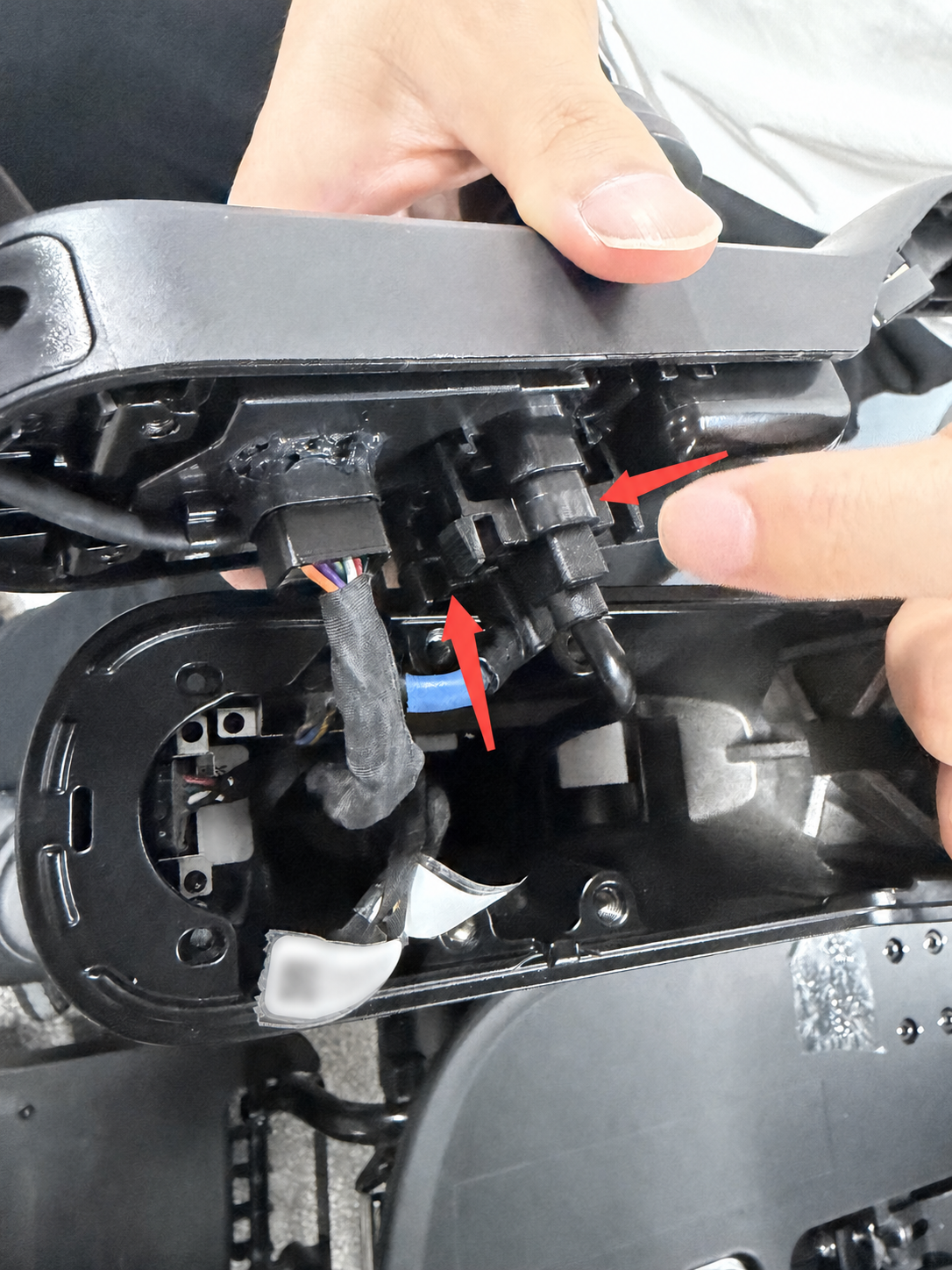
- Locate the Type-C module;
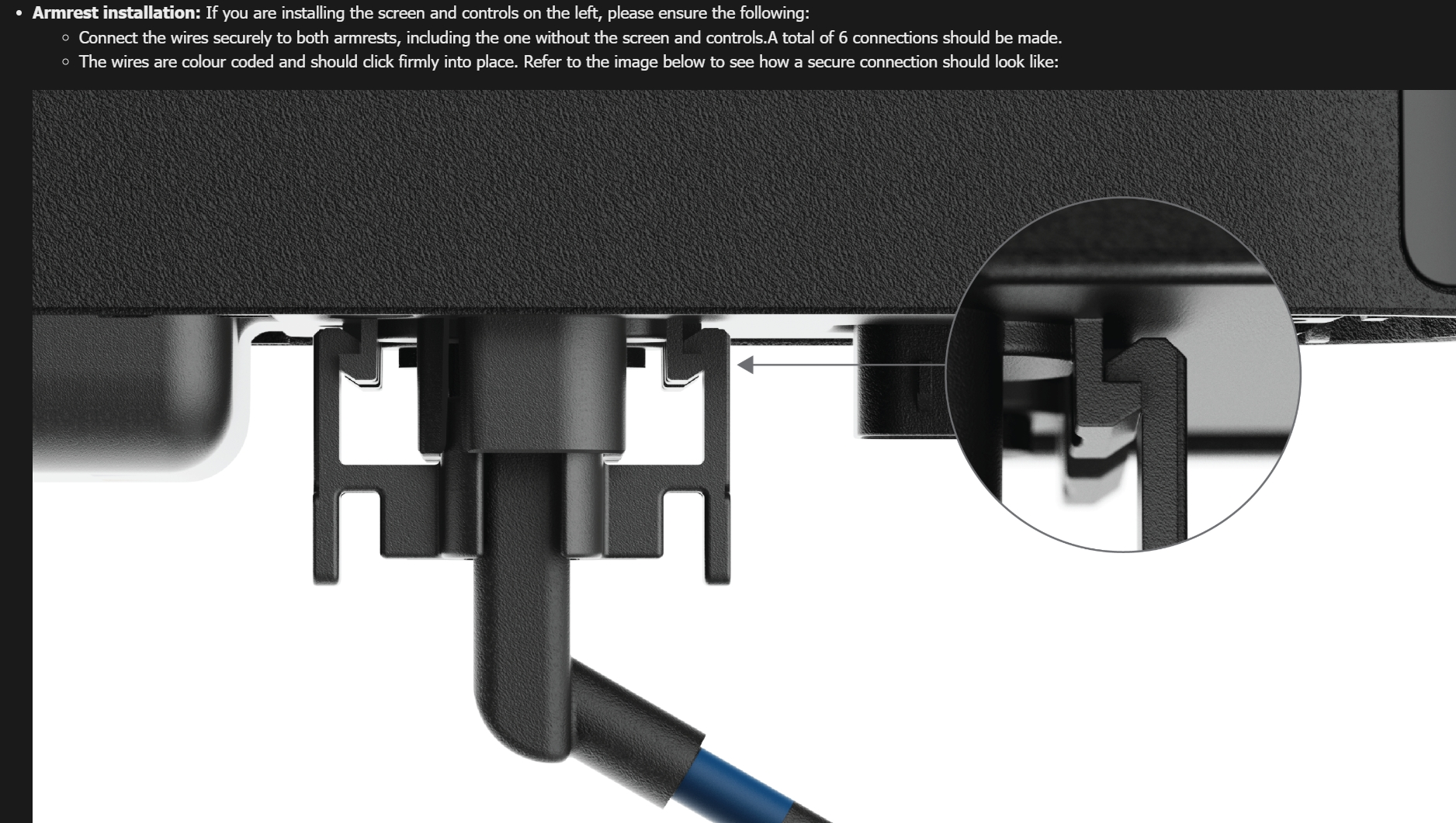
- Release the retaining latch, disconnect and reconnect the Type-C cable, and make sure the latch is fully engaged;
- After confirming that the connection is secure, power on the device and verify that the map, Wi-Fi, rear camera, and intelligent driving functions work normally;
- Once all functions have recovered, reinstall all components in reverse order.
If the issue persists, contact the Strutt Technical Support team.
¶ 4. Demonstration Videos and Connection Reference
▶ Play portrait video: ToF module inspection
3. ToF module inspection
▶ Play portrait video: Rear light inspection
4. Rear light inspection
¶ 5. Type-C Connection Reference
| Type-C connector location (QR code and device label redacted) | Correctly seated connector latch |
|---|---|
 |
 |