Collision Alert provides haptic (vibration) feedback through the joystick when you are near obstacles while driving in Manual Mode. It is enabled by default.
This guide explains how to enable the permission required to turn Collision Alert off, change the setting, and turn alerts back on.
¶ Before You Start
- Select Manual Mode. Collision Alert is supported in Manual Mode.
- To turn alerts off: Accept the Disable Collision Alert waiver in the Strutt app and enable the permission that allows collision alerts to be disabled.
¶ Turn Collision Alert On or Off
On the vehicle:
- Open Settings.
- Go to evSense → General → Collision Alert.
- Turn Collision Alert on or off.
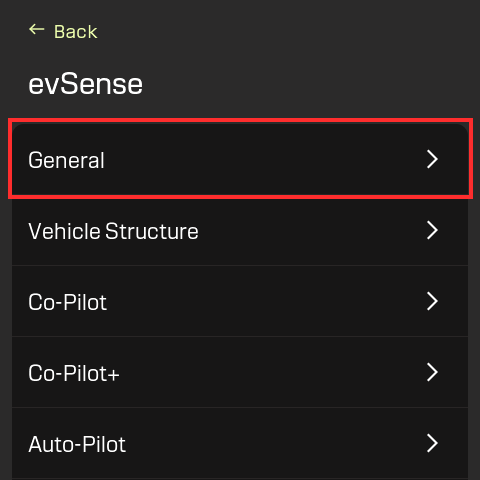
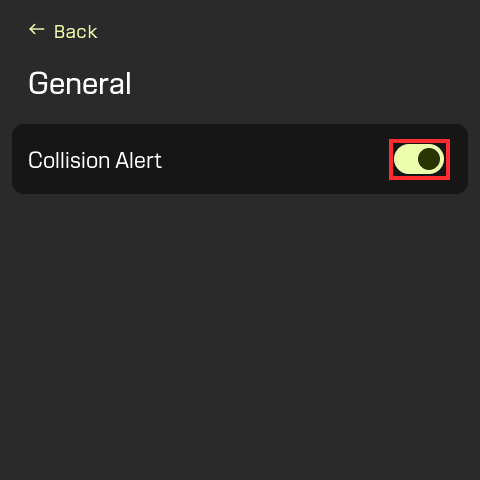
| Setting | Behaviour |
|---|---|
| On | Enables collision alerts, providing joystick vibration feedback near obstacles in Manual Mode. |
| Off | Disables collision alerts. Requires the permission to be enabled in the Strutt app first. |
After the required app permission is enabled, you can change the switch directly without a confirmation dialog.
¶ Turn Collision Alert Back On
On the vehicle:
- Open Settings.
- Go to evSense → General.
- Turn on Collision Alert.
¶ Compatibility With Other Functions
Only compatible with Manual Mode
¶ Safety Information
- Collision Alert can be turned off only after you accept the required waiver and enable the permission in the Strutt app.
- Stay alert and watch your surroundings, especially when collision alerts are disabled.
¶ Frequently Asked Questions
¶ Why can’t I turn off the Collision Alert?
Check that:
- You have accepted the Disable Collision Alert waiver in the Strutt app.
- You have enabled the permission that allows collision alerts to be disabled.
¶ How do I turn collision alerts back on?
Go to Vehicle Settings → evSense → General and turn on Collision Alert.
¶ What feedback does Collision Alert provide?
It provides haptic (vibration) feedback through the joystick when you are near obstacles while driving in Manual Mode.
¶ Is Collision Alert enabled by default?
Yes. Collision Alert is enabled by default in Manual Mode.