Level S gives your vehicle access to a higher speed level in Manual Mode and Co-Pilot Mode. The maximum available speed depends on local regulations.
This guide explains how to enable Level S, select it using the armrest controls, configure Co-Pilot for Level S, and return to a lower speed level.
¶ Before You Start
- Complete the waiver. Sign and enable the Level S waiver in the Strutt App.
- Fasten your seat belt. If the seat belt protection is enabled, fasten your seat belt before enabling or entering Level S, and keep it fastened while using Level S.
- Check your battery. Level S is unavailable with a flight-safe battery.
- Use the vehicle controls to select Level S. It cannot be done through App Remote Control.
- For Co-Pilot Mode: Also enable Co-Pilot Extended Speed.
When using Level S, fasten your seat belt, follow local regulations, and drive with caution.
¶ Enable Level S
Complete both steps before selecting Level S in Manual or Co-Pilot Mode.
¶ Step 1: Complete the Waiver in the Strutt App
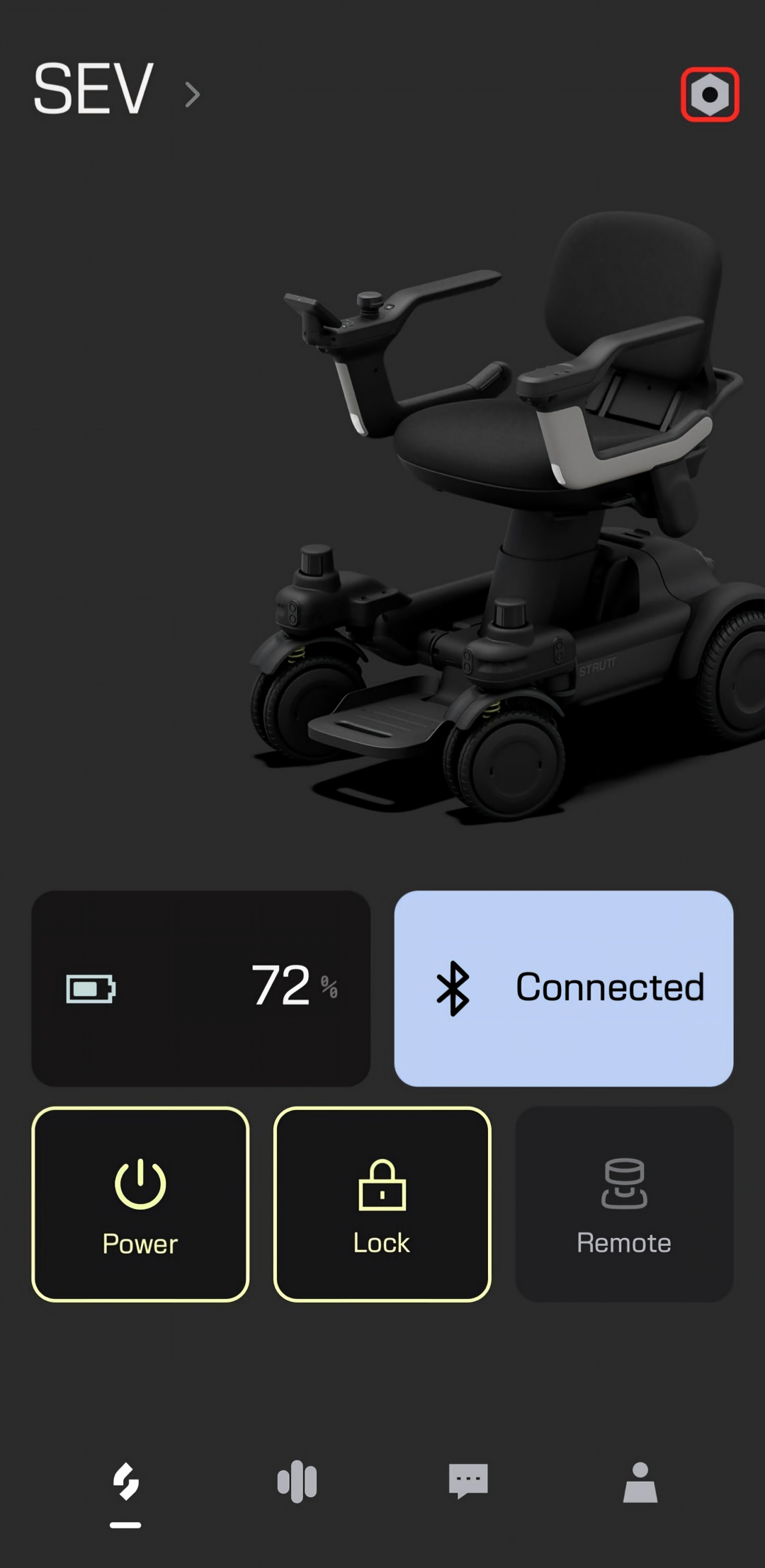
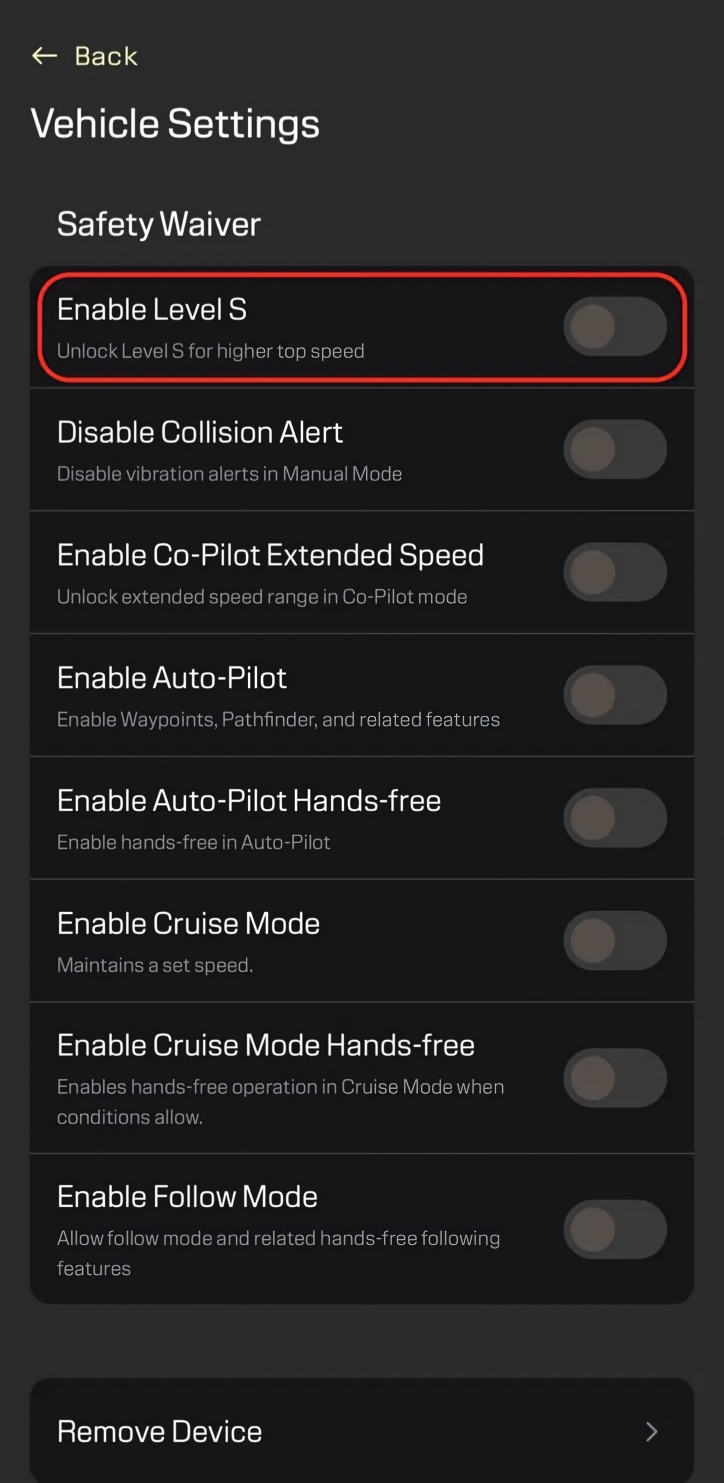
In the Strutt app, sign and enable the Enable Level S waiver.
- Open the Strutt app, tap Settings in the top-right corner, then select Safety Waiver.
- Tap the toggle next to the waiver. Read the agreement and scroll to the end, then select I Agree to All if you agree to its terms.
¶ Step 2: Enable Level S on the Vehicle
On the vehicle:
- Open Settings.
- Go to Quad Drive → Speed Levels → Enable Level S.
- When “Turn on Level S?” appears, read the message.
- Select Turn On to enable Level S, or Cancel to cancel.
¶ Select Level S in Manual Mode
After enabling Level S:
- Select Manual Mode.
- Press the + speed increase button on the vehicle armrest to increase the speed level to S.
- Check that S appears on the vehicle’s main screen.
¶ Use Level S With Co-Pilot
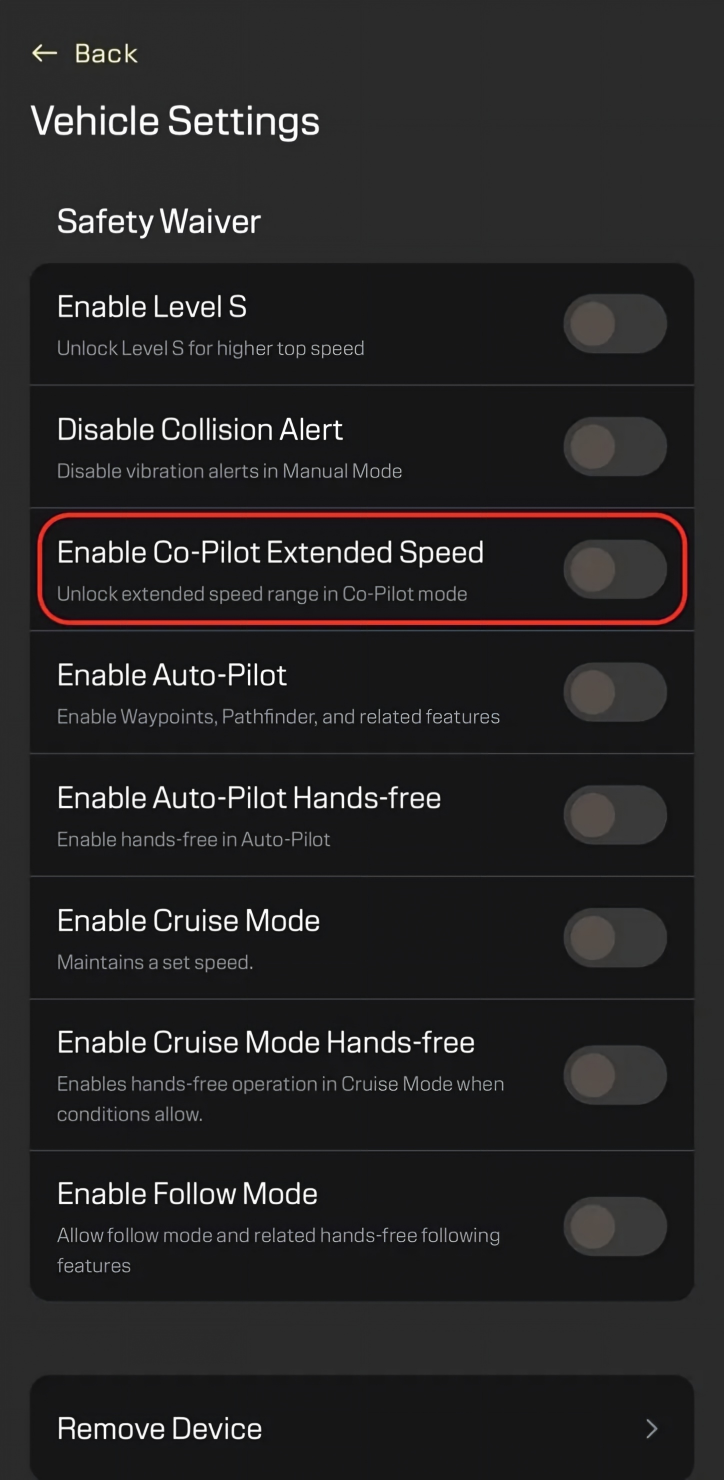
Co-Pilot requires Co-Pilot Extended Speed to operate at Level 4 and Level S.
¶ Step 1: Complete the Waiver in the Strutt App
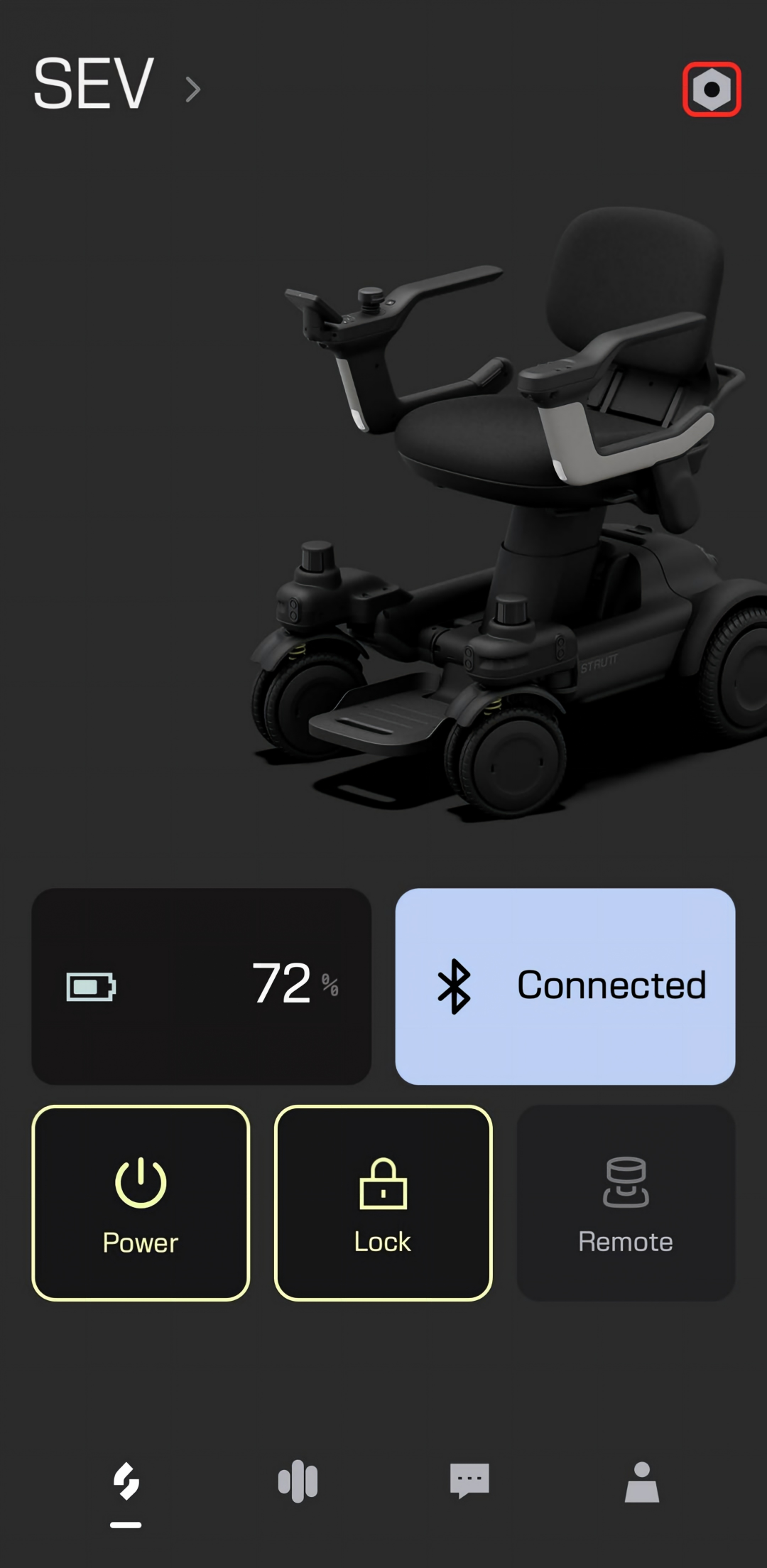
- Open the Strutt app, tap Settings in the top-right corner, then select Safety Waiver.
- Tap the toggle next to the waiver. Read the agreement and scroll to the end, then select I Agree to All if you agree to its terms.
¶ Step 2: Enable Co-Pilot Extended Speed
On the vehicle:
- Open Settings.
- Go to evSense → Co-Pilot → Extended Speed.
- Enable Extended Speed.
See the Guide: Co-Pilot Extended Speed for more information.
Drop-off Detection is turned off above Level 3, including Level 4 and Level S. Stay away from stairs, platform edges, and other drop-offs when this protection is off.
¶ Step 3: Select Co-Pilot and Level S
- Switch to Co-Pilot (C) mode either from the vehicle or Strutt app.
- Use the + speed increase button on the vehicle armrest to increase the speed level to S.
- Check that S appears on the vehicle’s main screen.
When the speed level reaches 4 in Co-Pilot, the screen displays a warning that Drop-off Detection is off.
¶ Exit Level S
Choose either method to return to a lower speed level.
¶ Option 1: Use the Armrest Controls
Use the - speed decrease button on the vehicle armrest to change from Level S to a lower speed level.
¶ Option 2: Use the Strutt App
Use the - speed control icon in the Strutt app to decrease the speed level and exit Level S.
¶ Understand the Display and Notifications
| Situation | What the screen shows |
|---|---|
| Level S is selected | S appears as the speed level on the vehicle’s main screen. |
| The speed level reaches 4 in Co-Pilot | A warning that Drop-off Detection is off. |
| You try to enable Level S before accepting the waiver | “Level S waiver required” — “Accept the Level S safety and regulation waiver in the app before enabling it.” |
| You enable Level S after accepting the waiver | “Turn on Level S?” — “Level S allows higher speed. Fasten the seat belt, follow local regulations, and drive with caution.” Options: Cancel or Turn On. |
| You try to select Level S before enabling it | “Turn on Level S first.” |
| Seat Belt Protection is enabled and you try to enter Level S without fastening your seat belt | “Buckle seat belt to use Level S.” |
| Seat Belt Protection is enabled and you unfasten your seat belt while in Level S | “Seat belt unbuckled. Level S unavailable.” |
| You try to enable Level S with a flight-safe battery | “Level S unavailable” — “Level S is unavailable with flight-safe battery.” |
¶ Compatibility and Restrictions
| Mode, function, or equipment | Level S availability |
|---|---|
| Manual Mode | Available after completing the waiver and enabling Level S in the vehicle settings. |
| Co-Pilot Mode | Also requires Co-Pilot Extended Speed, with Drop-off Detection turned off above Level 3. |
| App Remote Control | Cannot enable or select Level S. The app’s speed control can decrease the speed level to exit Level S. |
| Flight-safe battery | Level S is unavailable. |
| Seat Belt Protection | If enabled, the seat belt must remain fastened while using Level S. |
¶ Safety Information
- Sign and enable the Enable Level S waiver in the Strutt app, then enable Level S in the vehicle settings before use.
- Fasten your seat belt, follow local regulations, and drive with caution.
- If Seat Belt Protection is enabled, keep your seat belt fastened while using Level S.
- Level S is unavailable with a flight-safe battery.
- Level S cannot be enabled or selected through App Remote Control.
- To use Level S with Co-Pilot, allow Drop-off Detection to turn off automatically above Level 3.
- When Drop-off Detection is off, stay away from stairs, platform edges, and other drop-offs.
¶ Frequently Asked Questions
¶ Why can’t I select Level S?
Check that you have:
- Signed and enabled the Enable Level S waiver in the Strutt app.
- Enabled Level S under Settings → Quad Drive → Speed Levels → Enable Level S.
- Fastened your seat belt if Seat Belt Protection is enabled.
Level S is unavailable with App Remote Control or a flight-safe battery.
For Co-Pilot Mode, also enable Co-Pilot Extended Speed.
¶ Can I use Level S in Manual Mode?
Yes. Complete the waiver, enable Level S in the vehicle settings, then use the armrest speed increase button to select S while in Manual Mode.
¶ Can I select Level S from the app?
No. Use the speed increase button on the vehicle armrest.
You can use the app’s speed control to decrease the speed level and exit Level S.
¶ Can I use Level S with Smart Obstacle Avoidance?
Yes, in Co-Pilot (C). Enable Co-Pilot Extended Speed, which allows Drop-off Detection to turn off automatically above Level 3.
When Drop-off Detection is off, stay away from stairs, platform edges, and other drop-offs.
¶ How do I know Level S is selected?
The vehicle’s main screen shows the speed level as S.
¶ How do I exit Level S?
Use the armrest speed decrease button or the Strutt app’s speed control to select a lower speed level.